Running Megabonk on an Apple Silicon Mac
How one Windows game led me to build Pear, and where I want to take it next.
Update — October 20, 2026: Pear v0.1.0 was released today. An earlier version of this post described it as already available before its release. The release status and feature descriptions below have been corrected. The original publication date is unchanged.
I wanted to play Megabonk on my Mac. I owned the game, but it did not have a native macOS version. That small, personal problem became the starting point for Pear.
Getting the game to run was the first milestone. Turning that setup into something another person could install and use became Pear. Version 0.1.0 was released on October 20, 2026: a free, open-source Mac app that prepares a Windows Steam environment on Apple Silicon. You open Pear, sign in through the official Steam client, install a game you own, and launch it from your library.
Megabonk is the game that brought me here and the first game I have tested through that flow. The current release uses Wine 11.0, DXMT 0.80, and Apple's Rosetta 2. My longer-term goal is to run Windows games on Apple Silicon without Rosetta, but the downloadable release still depends on it.
This first post is about the path between wanting to play a game and having an application I could share: the working experiment, the compatibility layers underneath it, and the less visible work of making installation and recovery usable.
The first working game
The earliest working setup used Wine 11.0 and DXMT 0.80 from the frankea/Whisky Libraries 3.1.1 package. On my M4 Pro, Megabonk reached its menu and a Forest Tier 1 session after I signed in through the official Windows Steam client. My early experiment notes describe an essential detail in one sentence:
The Wine host used Rosetta.
That result gave me a working reference. I could see that this Windows build could run on my Mac through a compatibility stack. It also gave the next question a concrete shape: which parts of the stack still needed Intel execution, and what would it take to remove that dependency?
I had to distinguish several things that can look identical from the outside. A native Mac launcher can start an Intel process. A game can display its menu while failing later in a session. A successful launch can depend on files and settings accumulated during development.
Those distinctions became useful engineering questions. Could I repeat the installation? Could I identify the exact runtime that worked? Would Steam sign-in still work in a fresh environment? Would my saved progress survive quitting and starting again?
Pear grew around answering those questions.
What happens when I open Pear
The visible app is a small native interface written in Swift with AppKit. It calls a Rust executable that handles preparation and launching. The optional command-line interface uses that same Rust core, so both entry points work with the same installation and state. The launcher and bootstrap implementation are in the repository.
On first setup, Pear shows the downloads it needs, obtains the pinned runtime and Valve's Steam installer, checks their SHA-256 hashes, and prepares an isolated Wine environment. A Wine prefix is the directory that holds that environment's Windows-style filesystem, registry, and application state. It is where this Steam installation and its games live.
Pear then opens the official Windows Steam client. Steam handles authentication, the library, game downloads, and its normal Play flow. I wanted people to use the account and library they already understand. The shipping app does not depend on a separate macOS Steam installation.
The runtime has three main responsibilities:
| Responsibility | What handles it in v0.1.0 |
|---|---|
| Executing the Intel code used by the current runtime on Apple Silicon | Rosetta 2 |
| Providing the Windows interfaces expected by Steam and the game | Wine 11.0 |
| Translating Megabonk's Direct3D 11 graphics into Metal operations | DXMT 0.80, together with Wine's Metal integration |
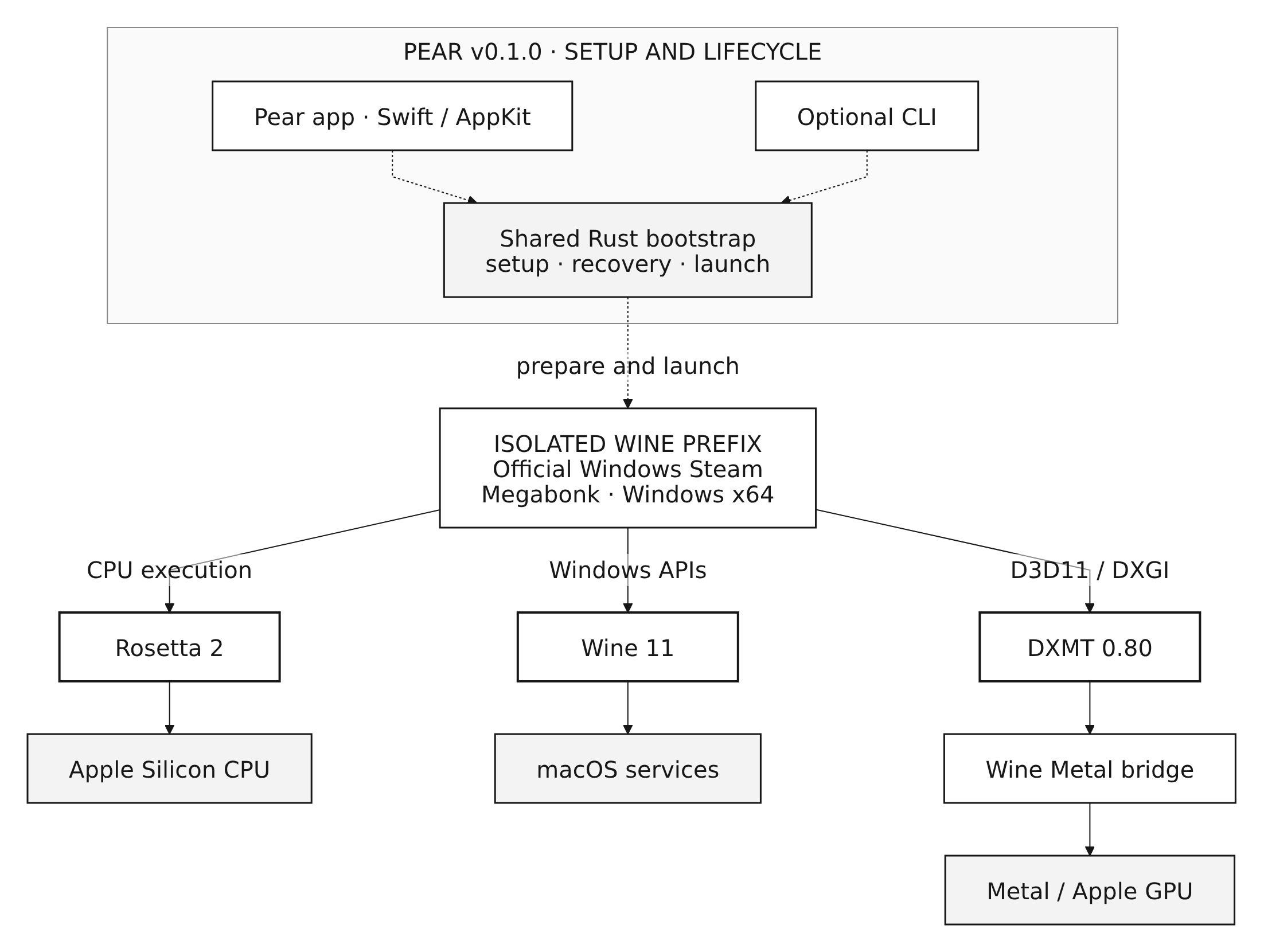
Figure 1. The v0.1.0 runtime, grouped by responsibility. Dashed arrows show setup and launch control; solid arrows show execution responsibilities. These boxes are not separate processes or a sequential frame-rendering pipeline.
The distinction I had to keep clear was that translating CPU instructions does not supply Windows operating-system services or translate a graphics API. All three responsibilities have to work together inside the running environment.
The picture shows Megabonk's selected graphics path. The runtime's component inventory contains additional libraries; a component's presence in the package does not make it a required stage in every game's rendering path.
The foundational compatibility work comes from Wine, DXMT, Rosetta, and the projects around them. My work in Pear has been to choose and integrate the pieces, manage the environment, handle failure, and package the result as a usable Mac application.
Turning the experiment into a release
Once I could run the game, the next challenge was making that result repeatable outside my development setup. Several parts of that work were less obvious than the first screenshot of a running game.
Knowing what was inside the runtime
A working collection of libraries was a starting point. For a release, I also needed to know where the files came from, which patches were applied, and which artifact a user would actually install.
The runtime used by this release builds Wine and several dependencies from pinned sources, including the CodeWeavers 26.3.0 FOSS Wine source. DXMT and some other components come from pinned upstream release binaries with their source revisions and notices recorded. The build recipe and input record make those choices inspectable.
This gives me a specific runtime to investigate when something breaks. I can compare the installed files with the intended artifact and trace changes back to recorded inputs. There is still a distinction between recording all of those inputs and reproducing every binary byte for byte; the release does not claim the latter for every component.
Getting through Steam's front door
The game was only part of the launch experience. An intermediate runtime candidate failed to render Steam's login window on my test machine. Another problem involved browser helper processes remaining after the login window closed. These failures were recorded during the runtime investigation and release work.
They mattered because Steam was the route into the game. If a player could not sign in, the fact that I had previously reached Megabonk's menu was of little help.
Pear's Steam compatibility patch makes a targeted change to the main Steam webhelper's GPU-process behavior and ties selected browser children to that browser's lifetime. Steam itself and running games are outside that cleanup group.
There is a related distinction in the Mac interface: successfully starting a process does not tell me that the Steam window is visible. Pear observes the window separately and can keep showing launch progress or offer a retry. That is a small piece of UI, but it communicates a much more useful state than the return code of a launch command.
Treating saved progress as part of the product
During development, it is tempting to fix a broken environment by deleting it and starting again. That becomes a poor default once the directory contains someone's installed games, Steam session, and saved progress.
Pear keeps the downloaded runtime, cached downloads, and private Wine environment separate. Runtime preparation uses a staging directory before activation, and the launcher checks existing state before continuing. The bootstrap makes preservation part of the setup flow rather than leaving it entirely to the user.
The environment currently lives under ~/Library/Application Support/Pear Preview. Removing or replacing the Mac app does not by itself remove that data. Recovery testing covered interrupted preparation and specific reinstall and restore cases; a general automatic repair system is still future work. The user guide describes that boundary.
Closing Pear's status window also leaves Steam and the game running. The app helps establish the session, and the player can continue using Steam and quit the game normally.
Making the application practical to distribute
The release packages are signed with Developer ID and notarized by Apple. A player can install the Mac app without setting up a compiler or enrolling in a developer program. The app shows preparation progress, allows cancellation and retry, and reuses an existing installation on subsequent launches. The underlying packaging and verification work is recorded in the release notes.
Version 0.1.0 adds app updates through Sparkle, local run history, and optional game compatibility reports. Players can keep records on their Mac, share a result manually, be asked after a game, or enable automatic sharing of selected observations. No report is sent until a sharing choice is confirmed. Submitted reports are reviewed privately before selected fields appear in the public game catalog.
Earlier public previews do not include Sparkle. Install v0.1.0 once manually, or upgrade through Homebrew if that is how you installed Pear. Homebrew installations continue to receive updates through Homebrew. See the update guide and reporting and privacy guide.
What v0.1.0 has actually demonstrated
Megabonk is my first validation game. On my M4 Pro, I have checked more than twenty minutes of active play, input and audio, and saved progress after quitting and relaunching. I also repeated installation from a fresh standard user account on the same Mac. These observations are in the game report.
Here is the scope of this release:
| Area | Current status |
|---|---|
| Platform target | Apple Silicon, macOS 15 or later; Rosetta 2 required |
| Gameplay testing | Megabonk on an M4 Pro with 24 GB RAM, running macOS 26.5.2 |
| Play and persistence | Owner-confirmed 20+ active minutes, input, audio, saved progress after relaunch, and specific recovery checks |
| Fresh installation | Checked from a fresh standard account on the same physical Mac |
| macOS 15 checks | App and CLI startup, plus Wine startup through Rosetta, checked on macOS 15.7.9; full Steam UI and gameplay checks are still pending |
| Other games and configurations | Selectable through Steam, but not established as compatible by these tests |
| Rosetta-free runtime | Experimental development; not the runtime shipped in v0.1.0 |
These are my own tests on one physical Mac. Preview.4 lowered the deployment target to macOS 15 without changing the gameplay-tested runtime. Full Steam and gameplay testing on macOS 15 is still pending. I have not yet measured comparative performance or separately verified controller and Steam Cloud behavior.
I want the game catalog to preserve that context as it grows. A result should say what was tried, on which machine, and what happened. Reaching a menu, playing a session, and restoring saved progress answer different questions.
The next goal: running without Rosetta
The current release gives me a usable application and a working reference for Megabonk. The next major technical goal is to run the same owned Windows game without Rosetta anywhere in the required runtime.
The intended architecture keeps Wine for Windows compatibility and DXMT for Direct3D 11 graphics, while moving the macOS host components to ARM64 and using FEX for guest CPU translation. This is the research architecture, separate from the v0.1.0 execution path.
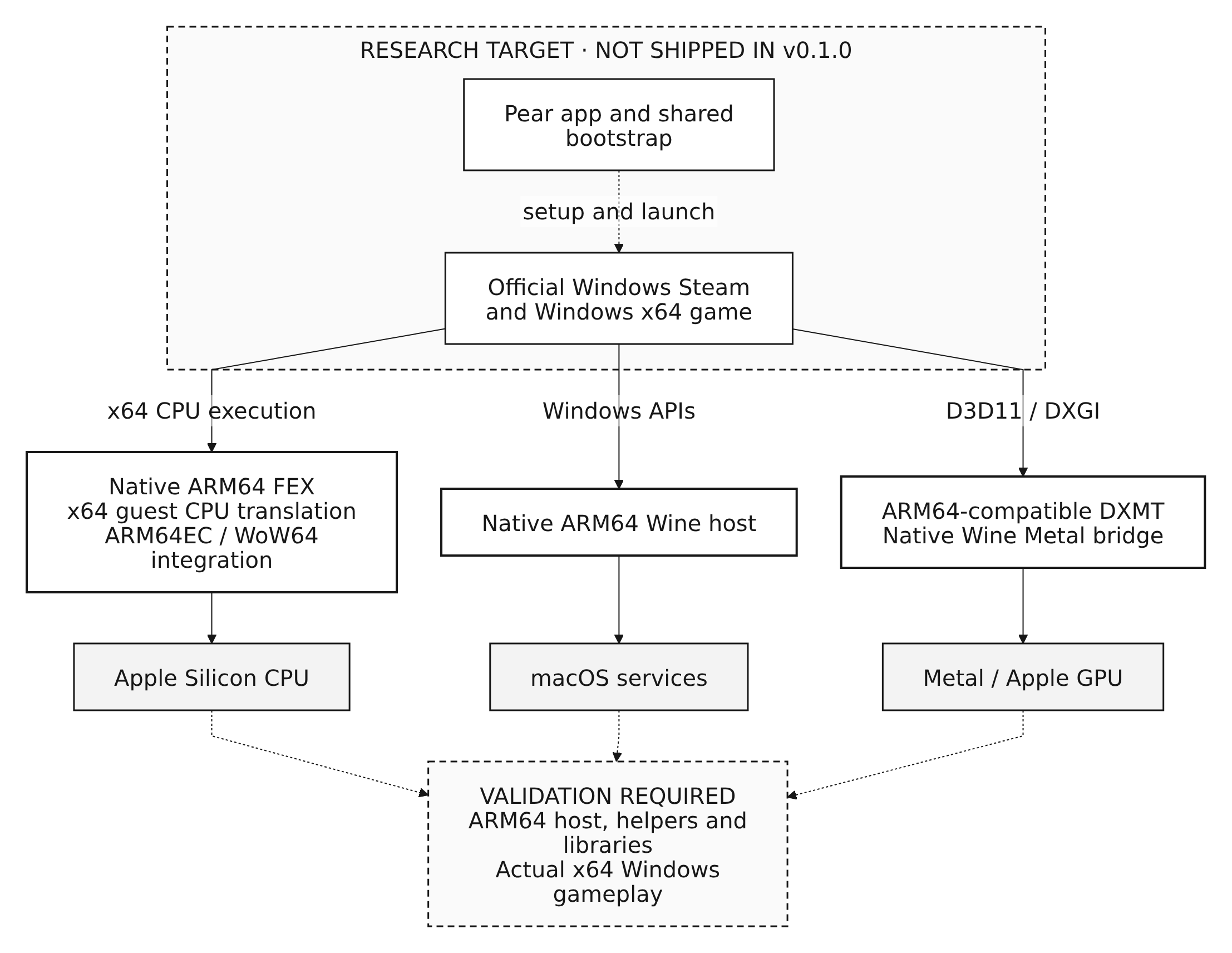
Figure 2. The Rosetta-free research target. This is not a description of the runtime included with v0.1.0.
FEX's intended job is to translate the x86/x64 instructions used by Windows guest code into instructions the ARM64 host can execute. Wine still has to provide the Windows APIs, and the graphics path still has to reach Metal correctly. Calls crossing between translated code and native components have to agree on how arguments, callbacks, and results are represented.
That means the work extends beyond replacing one executable. Memory protections, generated-code lifetime, threads, exceptions, and transitions between execution modes all become part of the integration. Steam brings its own helper processes and libraries into that same runtime boundary.
The test for success must follow the whole session. A native Pear app does not prove that the Wine host is native. A native Wine host does not prove that every required helper is native. Windows x64 game files are expected guest inputs; the dependency to eliminate is Rosetta execution in the required macOS host processes and libraries.
Experimental builds have reached Megabonk's menu, but sustained gameplay and complete verification of Rosetta independence remain unfinished. The development guide records the remaining work. Its current setup also depends on prepared development artifacts and component repositories that require collaborator access, so it is not yet a public, clean-clone player runtime.
For me, this work is valuable because it makes the execution path something I can inspect, understand, and improve further. Whether it is faster or more efficient will depend on measurements. Removing Rosetta is a dependency goal; performance is a separate engineering question.
I want the eventual player experience to stay familiar: open Pear, sign in to Steam, choose a game. Replacing the runtime underneath that experience will also require checking migration and saved progress, just as the current release does.
Where I want to take Pear
I started with a game I wanted to play. Working on Pear has brought me into Windows compatibility, CPU translation, graphics, process management, and Mac application distribution. Each layer has supplied a different reason why a program that launches successfully might still fail to become a usable game session.
The near-term work is to improve the release through concrete installation and game reports while continuing the Rosetta-free investigation. I plan to use this blog to explain those experiments: what I changed, what I tested, and what the results let me conclude.
If you try Pear, a report with your Mac model, macOS and Pear versions, game, and the point where something worked or failed is useful. Input, audio, and saved progress after relaunch are especially helpful observations. The repository has a guide to reporting results.
You can download Pear and browse the game catalog, or explore the source on GitHub. Sign-in and game installation happen through official Windows Steam, using games you own. Pear's original code is GPL-3.0-or-later; the reused components retain their own licenses and attribution.
For now, I can open Pear and play the game that started the project. In the next posts, I want to follow the work of getting that same Windows game to run without Rosetta.
References
- early experiment notes
- launcher
- bootstrap implementation
- component inventory
- build recipe
- input record
- runtime investigation
- release work
- Steam compatibility patch
- user guide
- release notes
- update guide
- reporting and privacy guide
- game report
- Preview.4
- research architecture
- Experimental builds have reached Megabonk's menu
- development guide
- guide to reporting results
- source on GitHub
Linked mentions
- Windows games on Mac
Pear is a free, open-source Mac app for playing Windows Steam games on Apple Silicon.